When to Quantize and What Model to Download
How to balance model quality, context length and inference speed on the hardware you have.
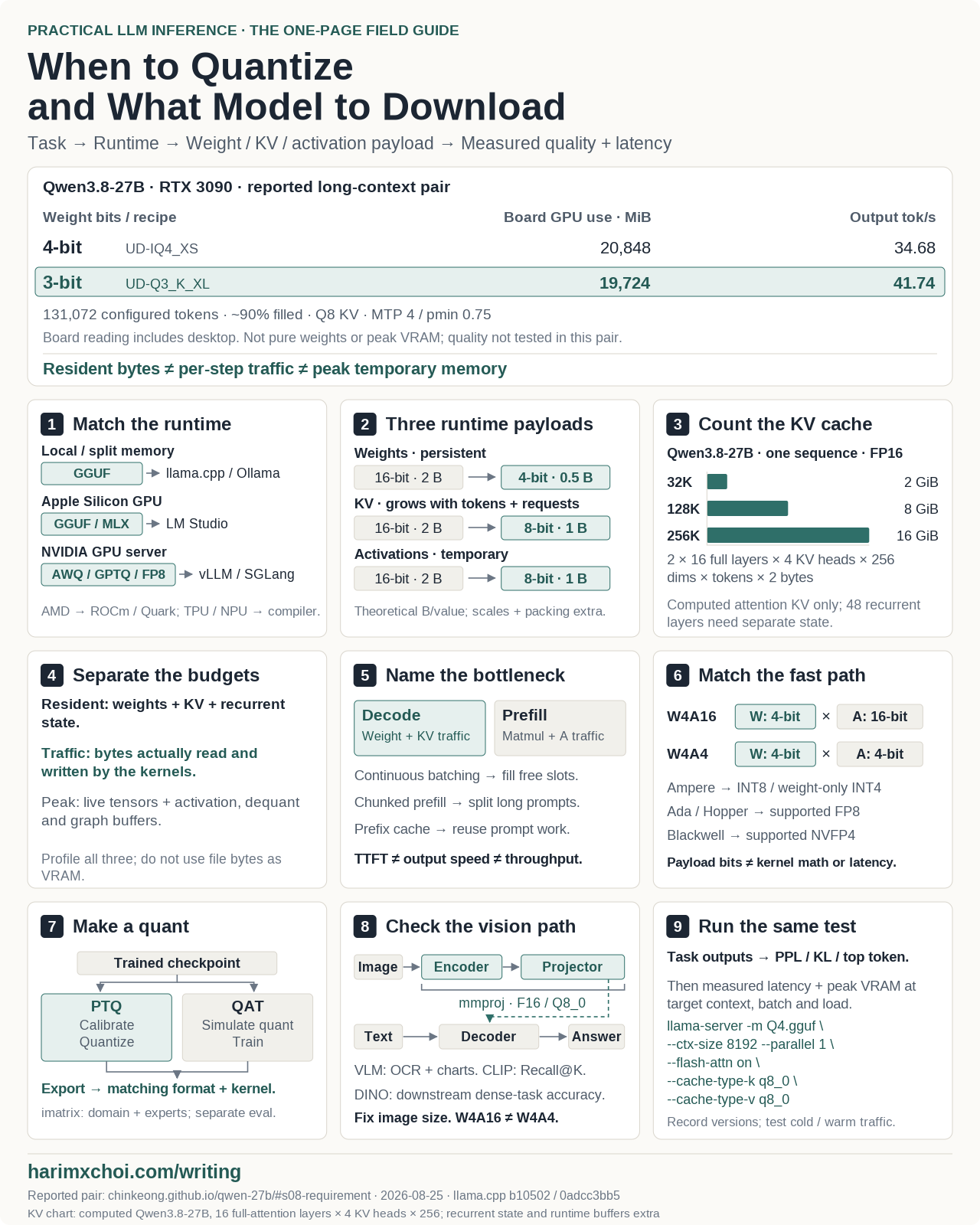
You have found the model you want. Now the download page offers Q4_K_M, Q6_K, IQ3_M and a few dozen other files. What should you actually run?
For a local GGUF model, Q4_K_M is a useful first recipe to try. But with Qwen3.8-27B on a 24 GB GPU, the practical question is what to give up: weight precision, cache precision, context, vision or a speculative drafter. A lower-bit model can leave room for the work you need. It can also simply produce more tokens before finishing it. The examples below use Qwen3.8-27B runtime measurements and calculations to separate those choices.
The goal is not a smaller download. It is less tensor payload during inference: fewer bytes held in memory or moved to the compute units, and sometimes faster low-precision arithmetic.
- Weights: persistent model tensors. Packing them reduces resident weight memory and can reduce the weight traffic that limits small-batch decoding.
- KV cache: attention state retained across tokens. Quantizing it can make room for longer contexts or more requests and reduce cache traffic in a matching attention kernel.
- Activations: intermediate tensors. Quantizing selected activations can reduce their bytes and enable low-precision matrix multiplication; accumulators and other tensors can remain higher precision.
These are separate settings, not one switch. A nominal 16-to-4-bit value uses one quarter of the raw value bits, but scales, mixed precision and packing add bytes. The kernel determines how that becomes memory traffic and latency. TensorRT-LLM’s memory breakdown, SmoothQuant’s W8A8 implementation, and the Transformers cache guide describe these different targets.
The order of the decision is: pick the model for the task, the format for the runtime, and the precision for the memory budget.
You can read this in three ways:
- Picking a download: start with the short answer, the GGUF comparison and settings to copy.
- Planning a server: read memory and speed, the KV cache, hardware and engines.
- Making a quant or working with images: continue to PTQ and QAT, vision-language models and vision encoders.


The short answer
Choose the runtime before the filename. GGUF is a file format that contains tensors and metadata; Q4_K_M is one quantization choice inside it. AWQ and GPTQ describe quantization methods and checkpoint configurations. FP8 describes a numerical format. They are not interchangeable download extensions. Hugging Face’s GGUF guide shows how to inspect the tensor types rather than guess from a repository name.
Table 1. Starting points by deployment path. Keep a higher-precision file available when comparing quality.
| Your setup | Download or export | First comparison | What changes the choice |
|---|---|---|---|
| Local llama.cpp, Ollama or LM Studio with the llama.cpp runtime | A GGUF for the supported model architecture | Q4_K_M versus Q6_K or Q8_0 | Available memory, your task results and the actual kernel speed |
| Apple Silicon with an MLX runtime | An MLX-compatible checkpoint | A supported 4-bit recipe versus a higher-precision one | Unified-memory budget, context length and measured speed |
| NVIDIA GPU serving | A checkpoint supported by the GPU and engine | AWQ/GPTQ weight-only for capacity; FP8 W8A8 for a supported compute path | GPU generation, prompt length, concurrency and quality |
| AMD GPU serving | A ROCm-supported FP8 or Quark recipe | The recipe supported by that GPU and backend | MI300-class FP8 versus newer MX formats, kernel availability and quality |
| Long context or many requests | The same model weights, with a separate cache setting | 16-bit cache versus 8-bit cache | Cache capacity, long-context accuracy and attention-kernel support |
| Vision-language model | Language weights plus the matching vision components | Quantized decoder with the supplied vision precision | OCR, charts, image resolution and multimodal calibration |
| Standalone CLIP or DINO encoder | A runtime-compatible encoder export | Full precision versus supported INT8/FP8 | Retrieval or dense-feature quality, not language perplexity |
| TPU or NPU | The vendor-supported compiled format | A recipe for that chip and model | Compiler coverage, numerical format and fallback execution |
Two details prevent expensive wrong downloads. LM Studio supports both llama.cpp/GGUF and MLX on Apple Silicon. And the current vLLM hardware matrix does not give NVIDIA and AMD the same AWQ/GPTQ support; AMD has its own Quark routes.
A download page worked example
Suppose you want Qwen3.8-27B in llama.cpp. Start with the official model card for the architecture and template, then choose a compatible recipe from a GGUF repository. A Q4_K_M, UD-IQ4_XS and UD-Q3_K_XL are different tensor allocations, not interchangeable labels for the same execution.
Check the runtime version, license and whether the recipe includes vision or MTP components. Start with one request and a modest context:
llama-server -m Qwen3.8-27B-Q4_K_M.gguf --ctx-size 8192 --parallel 1 \
  --n-gpu-layers all --flash-attn on \
  --cache-type-k q8_0 --cache-type-v q8_0
Replace the filename with your downloaded artifact. Read the startup allocations for model tensors, attention cache, recurrent state and compute buffers; then measure the peak during a real prompt. Loading successfully is not evidence that every layer stayed on the GPU or that a long prompt will fit.
How big is a “4-bit” model, and how fast will it run?
The weight representation is only the first part of the execution budget:
Working memory ≈ enabled model / draft / vision weights
               + attention KV + recurrent state
               + activations + workspace / runtime buffers
For a concrete weight-payload ledger, one Qwen3.8-27B NInfer profile on RTX 5090 reports 16.02 GiB of device weights without speculation, 16.44 GiB with MTP and 17.03 GiB with DFlash2. Enabling its vision component adds another 0.275 GiB. KV and workspace are additional. These component-specific figures describe that runtime’s NVFP4 recipe and do not transfer directly to a GGUF or MLX checkpoint.
Bits per weight
Bits per weight, or BPW, count the encoded values and their side data. A Q4_0 block holds 32 four-bit codes and a two-byte scale: 16 + 2 bytes, or 4.5 BPW. Mixed recipes can keep sensitive tensors at higher precision. The GGML block definitions specify that representation.
Moving from 16 to four bits reduces raw value bytes to one quarter; three bits use three sixteenths. That is a representation calculation, not a prediction of peak GPU memory, memory-bus traffic or answer quality.
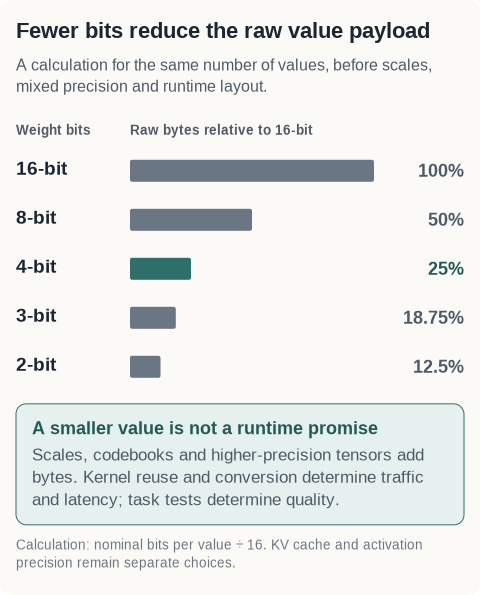
In this post, GB means decimal gigabytes and GiB means powers of 1,024. Memory figures identify whether they describe tensors, a cache allocation, a process or the whole GPU.
The KV cache
The model saves keys and values from earlier tokens instead of recomputing them. For conventional attention:
KV bytes = 2 × attention layers × KV heads × head dimension
           × cached tokens × independent requests × bytes per value
For the basic structure, Llama-3 8B has 32 attention layers, eight KV heads and head dimension 128: an 8,192-token FP16 cache is 1 GiB. Use the KV-head count, not the query-head count.
Qwen3.8-27B changes the arithmetic. Its configuration has 16 full-attention layers and 48 Gated DeltaNet layers. The full-attention layers use four KV heads of dimension 256: 65,536 FP16 bytes per token. The recurrent layers have separate state rather than a full growing KV history.
Table 2. Calculated attention-KV payload for one Qwen3.8-27B sequence. K means 1,024 tokens. q8_0 and q4_0 include their block scales.
| Occupied tokens | FP16 KV | q8_0 KV | q4_0 KV |
|---|---|---|---|
| 32K | 2.00 GiB | 1.0625 GiB | 0.5625 GiB |
| 128K | 8.00 GiB | 4.25 GiB | 2.25 GiB |
| 256K | 16.00 GiB | 8.50 GiB | 4.50 GiB |
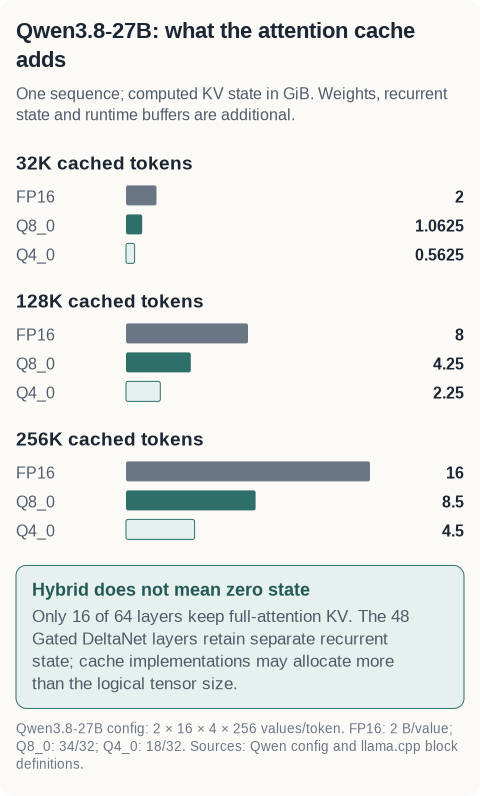
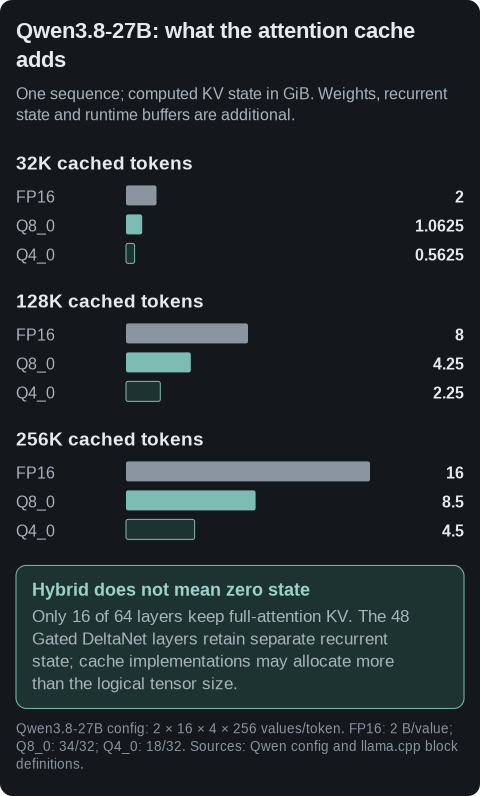
At 128K, changing FP16 KV to q8_0 saves 3.75 GiB without changing weight precision. That is a different choice from Q4-to-Q3 weights. The table does not establish their relative long-context quality; recurrent state, padding, prefix sharing and temporary buffers belong in the engine’s report.
Speed
Small-batch dense decoding often streams weights repeatedly; long-prompt processing has different matrix shapes and temporary allocations. Measure both, plus the time to finish the task.
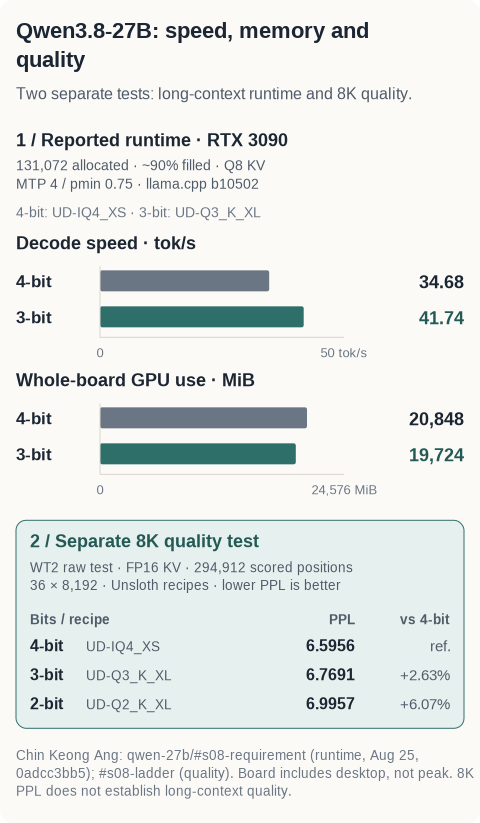
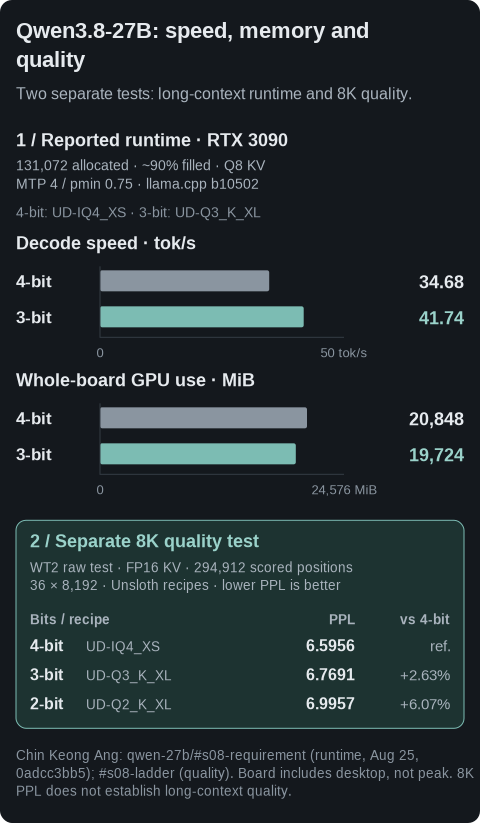
A Qwen3.8-27B RTX 3090 report compares two recipes at a 131,072-token allocation filled to roughly 90%, with the same Q8 KV and MTP4/p-min 0.75. Its whole-board memory includes the desktop:
| Weight recipe | Board memory | Decode |
|---|---|---|
| 4-bit · UD-IQ4_XS | 20,848 MiB | 34.68 tok/s |
| 3-bit · UD-Q3_K_XL | 19,724 MiB | 41.74 tok/s |
That pair uses about 1.10 GiB less board memory and delivers 20.4% higher decode speed at three bits. It does not measure task-quality parity or memory-bus bytes.
What GGUF file should you pick?
Compare Q4 with a higher-precision recipe when memory allows. Consider Q3 or Q2 when they make a useful workload possible: keeping the model on the GPU, retaining more context, or leaving room for vision, a drafter or another request. The saved weight payload has to buy something you actually use.
Then check time per completed task, not just tokens per second. In the same author’s separate Aider repair benchmark, Qwen3.8-27B Q2 and Q4 each solved 96 of 225 exercises, but not the same exercises. On jointly solved tasks, Q2 used 42.1% more completion tokens and had 19.7% longer median task time. Same final count, different work and cost. Reported Aider results.
A separate 8K quality test of the same base model reports the following. These are WikiText-2 perplexities over 294,912 scored positions with FP16 KV, not quality at the 131K speed-test window:
| Recipe | Perplexity ↓ | Change from Q4 reference |
|---|---|---|
| 4-bit · UD-IQ4_XS | 6.5956 | Reference |
| 3-bit · UD-Q3_K_XL | 6.7691 | +2.63% |
| 2-bit · UD-Q2_K_XL | 6.9957 | +6.07% |
What an imatrix does
An importance matrix, usually called an imatrix, stores statistics gathered from calibration text. The quantizer uses them to assign more cost to damaging rounding errors. It is used when making the file, not as an extra correction pass during inference.
The recipe should identify its calibration data and tensor allocation. An imatrix made from code is not automatically representative of documents, other languages or visual tasks. The imatrix documentation describes the collection pass.
Use calibration text that resembles the workload, while keeping evaluation examples separate. For a multilingual assistant or a code model, a narrow calibration sample can miss behavior you care about. For a mixture-of-experts model, it can also miss experts that the sample rarely activates.
UD and IQ2 files
Unsloth’s Dynamic GGUF recipes choose precision across tensors according to the model. A UD-Q4_K_XL and a plain Q4_K_M can therefore be different mixed-precision allocations, even when both names suggest four bits. Read the model’s recipe and runtime guidance, then inspect what the loader actually reports.
IQ2 is not simply a two-bit integer assigned independently to each weight. It uses grouped codebook indices with signs and scales. A block-level BPW figure also does not include every higher-precision tensor in the model. The original IQ2 implementation makes that representation explicit.
Treat the upload as a particular recipe: model revision, calibration, tensor allocation and runtime support. That is more informative than ranking files by the smallest number in their names.
Check a download in a few minutes
First check whether it does your work. Use the same prompts and generation settings for both files, and include failures you would notice in practice: malformed JSON, missed constraints, wrong calculations or a weak answer to a long document.
Then measure memory and speed at the context length you intend to use. If the smaller file forces fewer CPU/GPU transfers, it can win by more than its nominal bit width suggests. If its kernel is slow, it may lose.
For a closer numerical comparison, add perplexity or compare output distributions against the reference. KL divergence measures how the distributions differ; top-token agreement measures how often they choose the same most likely next token. These help locate drift, but your actual task decides whether that drift matters.
A bigger model at 4 bits, or a smaller one at 8?
Use the memory saved by quantization to compare more than one model size. A larger model can retain useful capabilities after compression, while a smaller model can benefit from better precision or cheaper generation.
On a 24 GB card, a Qwen3.8-27B low-bit recipe might keep the larger model resident where its eight-bit version cannot. But a smaller higher-precision model may leave more room for long inputs, images or concurrent work. Compare both with the same occupied context, output budget and task grader. Nominal parameter count alone does not make the comparison fair.
The task can reverse the choice. A Qwen3 study found an 8B eight-bit model ahead of a 14B four-bit model on AIME25, while four-bit weights were more memory-efficient on GPQA-Diamond. Its comparisons also account for the KV cache and reasoning length, rather than weight storage alone.
That is why “use the biggest model that fits” is incomplete. Compare a larger quantized model and a smaller higher-precision one on the same task budget: enough context, enough output tokens and a latency you can use. At very low bits, include both options instead of assuming a universal crossover.
For MoE models, total parameters determine weight storage, while the active experts help determine work per token. Routing, expert residency and communication can change the speed. An “A3B” label is not a three-billion-parameter download.
Should you quantize the KV cache?
Start by looking at the cache’s share of memory. If it limits context or concurrency, eight-bit cache is a useful first comparison with the 16-bit baseline. If it is small, changing it may have little effect on the capacity you need.
In llama.cpp, the key and value cache types are independent settings. In vLLM, FP8 cache support depends on the model, attention backend and scaling configuration. Smaller storage and faster attention are separate outcomes.
Architecture matters before cache precision. Grouped-query attention stores fewer KV heads; latent attention compresses the stored representation; hybrid models can replace some attention layers with recurrent or linear state. These designs change the number of bytes before any cache quantizer is applied.
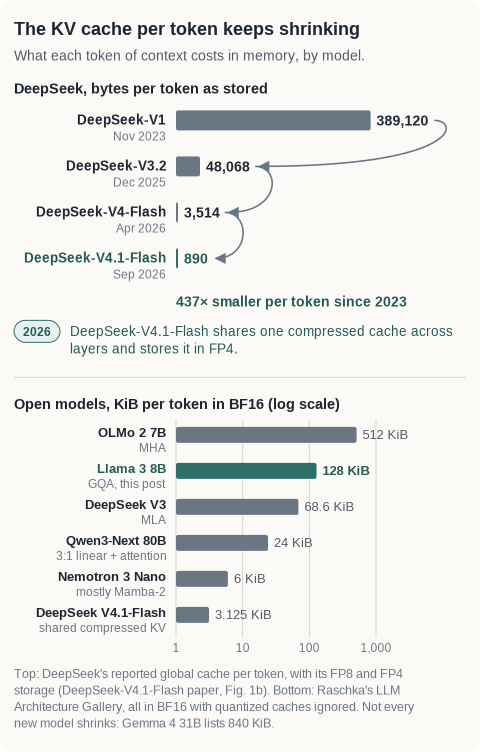
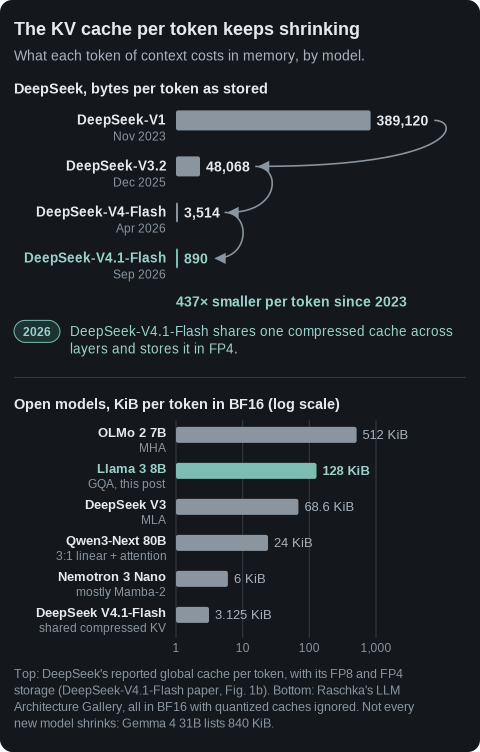
The DeepSeek series provides a concrete example: its V4.1-Flash paper reports cache storage falling from 389,120 bytes per token for V1 to 890 for V4.1-Flash, combining architecture changes and reduced precision. That is a comparison across generations, not a 437-fold gain from changing one cache dtype. Paper, Figure 1(b).
Keys and values also need not use the same quantizer. KIVI uses per-channel quantization for keys and per-token quantization for values. The useful question is how the scheme handles the two distributions, not only whether both are called four-bit.
For Qwen3.8-27B at 128K, q8_0 attention KV is 4.25 GiB versus 8 GiB at FP16. Four-bit cache reduces that to 2.25 GiB. Those savings answer a capacity question; a long-document or tool-use test answers whether the lower cache precision preserves the information you need.
For deployment, compare your intended long documents and concurrent requests. Record peak memory, attention backend, time to first token and generation latency. Cache settings can make a model fit, but the matching attention kernel decides whether they make it faster.
When do activations matter?
Weight-only quantization is a useful first step for bandwidth-limited local generation. Activation quantization becomes more interesting when long prompts or large batches make matrix multiplication a substantial part of the cost.
W4A16 usually names four-bit weights with higher-precision activations. It does not completely describe the arithmetic of every kernel that loads a low-bit file. Some GPU kernels dequantize tiles to FP16 or BF16; CPU paths can use integer activation blocks and integer dot products. For example, llama.cpp’s Q4_K CPU dispatch pairs the weights with Q8_K working blocks.
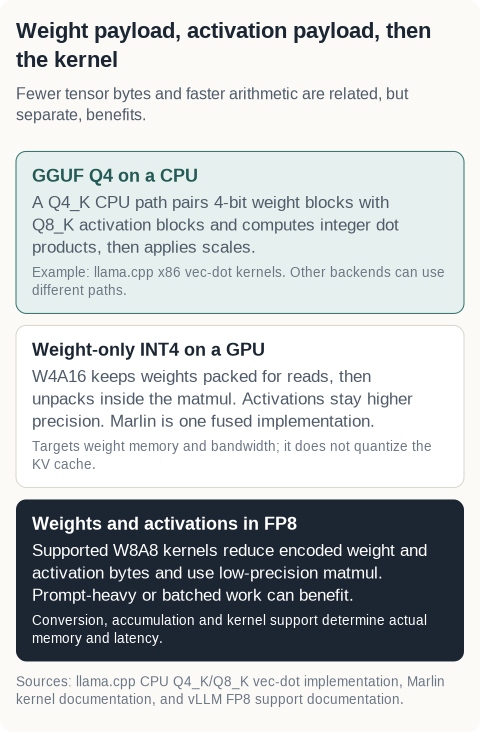
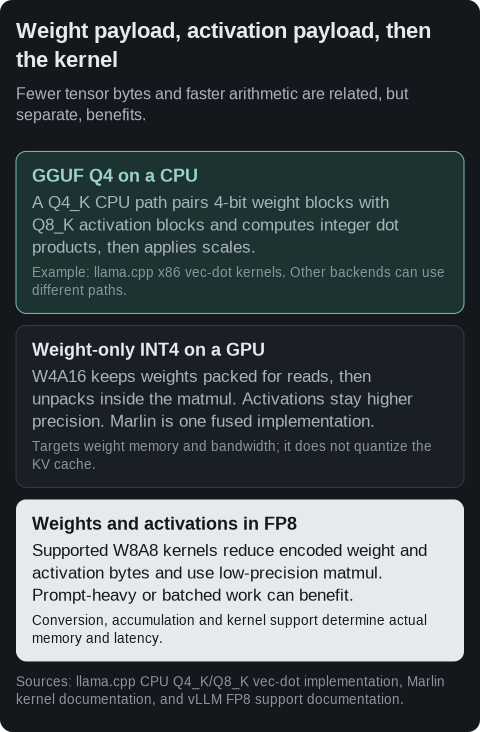
FP8 W8A8 and supported FP4 paths can reduce the precision of the matrix multiplication itself. The gain depends on native hardware support, block shapes, scaling and the rest of the workload. A four-bit weight file does not automatically use four-bit tensor-core arithmetic.
Outliers are part of the difficulty. A scale that accommodates one very large activation can spend most of its range on values that rarely occur. SmoothQuant moves some scaling difficulty into the weights; QuaRot and SpinQuant spread it with rotations.
INT4 and FP4 are different number systems despite using four bits. NVFP4 combines FP4 values with block scales; software, scaling and hardware have to agree on the representation.
A Qwen3.8-27B NInfer fork for RTX 4090 isolates a different lever: identical weight bytes, but selected prefill inputs may use INT8 tensor-core arithmetic.
| Same-binary paired prefill | Original activation route | INT8 activation route |
|---|---|---|
| 64K-token prompt | 27.4–27.6 s | 17.2 s |
| 128K-token prompt | 64.0 s | 43.0 s |
The September 26 comparison alternated the two artifacts; decode remained 52.0 tok/s in both. Both passed the author’s 45 deterministic tasks, a small check rather than broad quality parity. This result requires that custom runtime and artifact. There is no flag that turns any GGUF into W8A8.
Does the hardware change the answer?
Yes: the chip and backend determine which numerical formats have a fast path. Check both. A format may be storable, emulated or native, and those are three different capabilities.
On NVIDIA, Ampere provides INT8 and BF16 paths but no native FP8 tensor-core path. Ada and Hopper add FP8; Blackwell adds newer block-scaled low-precision paths. A supported AWQ/GPTQ checkpoint can be useful for weight capacity even when its kernel does not perform native INT4-by-INT4 arithmetic.
On AMD, MI300-class FP8 and MI355-class MX formats are separate targets. Quark in vLLM documents MX formats and mixed-precision recipes, including execution paths that emulate a lower-bit format on other GPUs. “AMD supports quantization” does not identify the checkpoint or kernel you need.
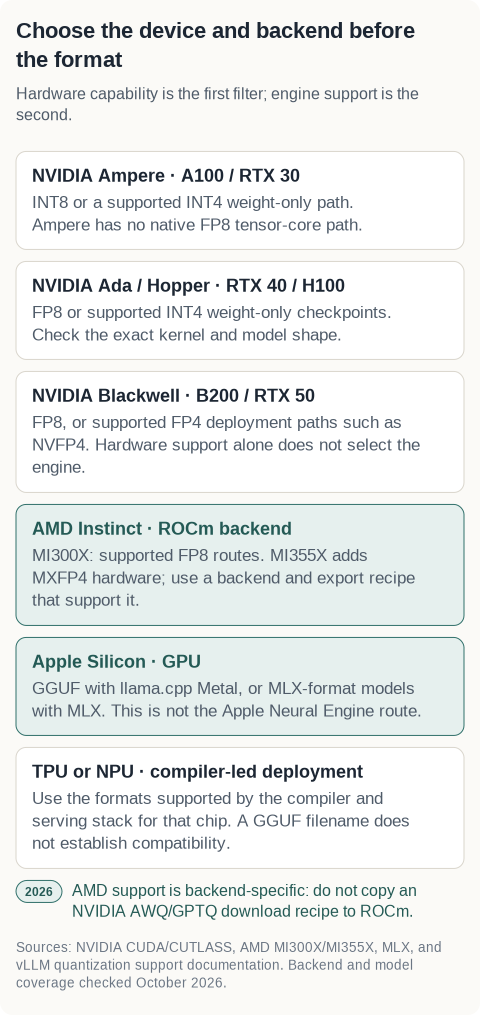
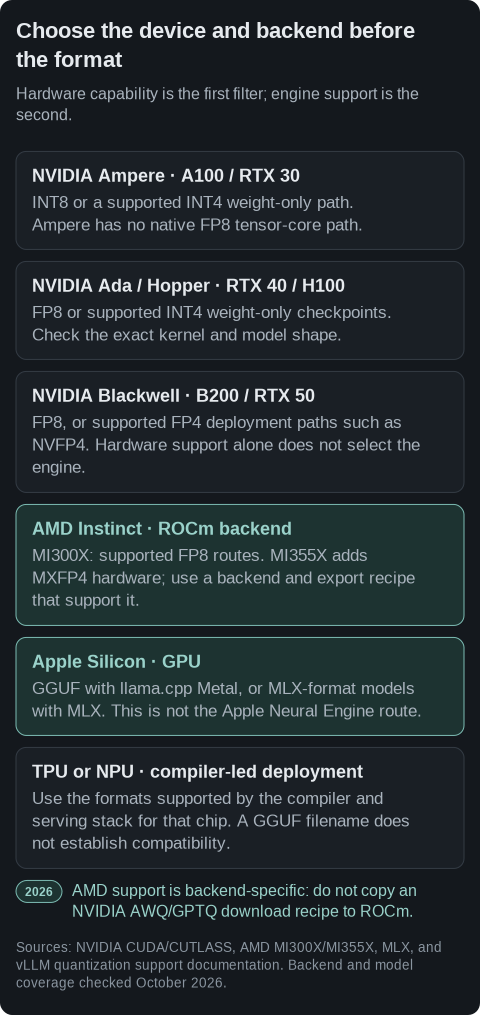
Apple Silicon has another important split: the GPU and the Neural Engine are different execution paths. MLX is a route for local models on the GPU; Core ML’s W8A8 guidance concerns models running fully or mostly on the Neural Engine. Do not apply that recommendation to every Mac LLM runtime.
For TPU and NPU deployment, start from the supported compiler recipe. Google’s TPU v6e and Ironwood have different precision capabilities. Qualcomm AI Hub’s compiled bundles and OpenVINO GenAI’s NPU path also have their own supported weight formats and model coverage.
A Mac can fit the model and still keep you waiting
A published M5 Pro 48 GB test holds Qwen3.8-27B weights at four bits and KV at eight bits, with DFlash2, one stream and no prefix reuse. Its raw receipt records:
| Input-token target | Time to first content/reasoning | Decode |
|---|---|---|
| 4,096 | 9.2 s | 38.5 tok/s |
| 32,768 | 85.6 s | 28.4 tok/s |
| 65,536 | 214.6 s | 24.6 tok/s |
These are one sample per input size, oMLX 0.6.3, with 2,048 requested output tokens. The table uses the harness’s first nonempty content/reasoning timestamp, not its earlier role-only response chunk.
In a separate 130,034-input-token run, oMLX 0.6.3rc3 completed 76 output tokens in 591 seconds while prefill briefly approached the server’s 38 GB memory watermark. A steady-state estimate would miss that temporary pressure. On unified memory, leave room for prefill and other applications, not only the model and its cache.
The practical check is short: model architecture, checkpoint format, GPU or accelerator generation, backend and runtime version. A compatible filename answers only one of those questions.
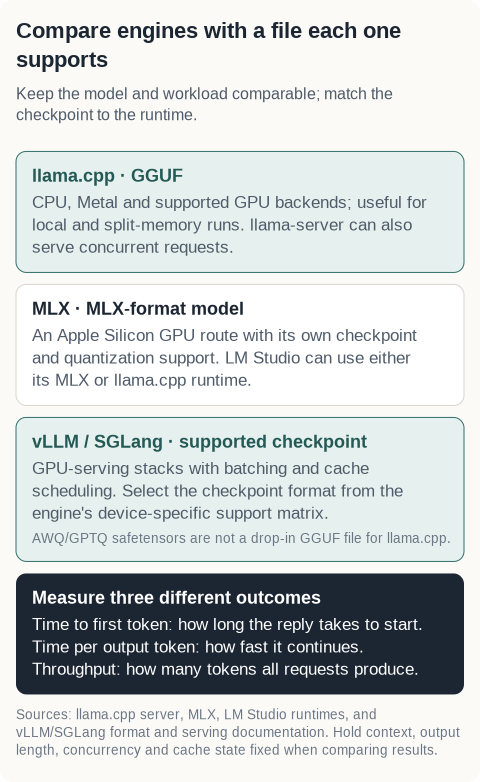
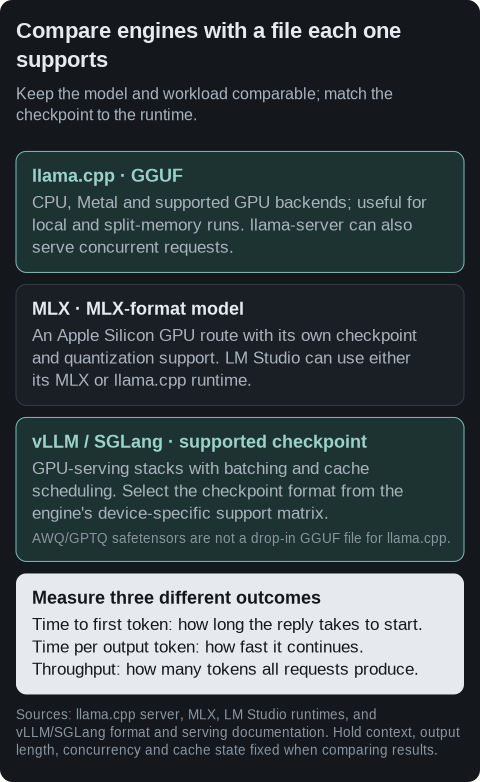
vLLM or llama.cpp?
Choose the supported model-and-format combination first, then test how the engine behaves under your workload.
llama.cpp is not just a CPU engine. It supports GPU offload, split CPU/GPU execution and a server with parallel requests and continuous batching. For local GGUF use, that makes it a natural starting point.
vLLM focuses on serving workloads with scheduling, paged cache management, chunked prefill and prefix caching. It supports several checkpoint formats, but each backend has its own kernel coverage. Its GGUF integration is a separate, currently experimental path rather than a reason to assume every format runs equally well.
Chunked prefill breaks a long prompt into pieces so it can be scheduled alongside other work. Continuous batching admits and retires requests as they progress. Prefix caching reuses already-computed prompt blocks when requests share a prefix; it saves prompt work, not the work of generating a new continuation. vLLM optimization guide and prefix caching guide.
Measure three things separately: time to first token, time per output token, and total throughput. A configuration can improve throughput while making an individual request wait longer.
Use the same request set, context lengths and concurrency for the comparison. Separate cold and reusable-prefix traffic. Repeating one prompt can produce an impressive warm-cache number that says little about the first request from a new user.
For one Mac user, MLX belongs in the comparison too. For many GPU users, vLLM and SGLang are candidates with backend-specific support. The model and the load determine the answer more reliably than “laptop engine” versus “server engine.”
When should you quantize it yourself?
Quantize a model yourself when available checkpoints miss your target: domain quality, runtime support or a useful precision allocation.
For Qwen3.8-27B, that might mean adapting your own fine-tune, calibrating on your document or coding workload, or exporting to a runtime whose supported representation is missing. First compare existing recipes: a custom quant is useful when it changes a measured constraint, not merely because its bit count is smaller.
“Post-training” tells you that the starting checkpoint is already trained. It does not mean every method simply rounds weights, or that every recipe uses the same data and compute. Codebook learning, block reconstruction and scale or rotation optimization can make very different files.
Quantization-aware training, or QAT, trains while simulating the target quantizer, then exports the model for inference. The simulated representation should match the deployed one. Google’s Gemma 4 QAT release is an example of QAT and GGUF working together, not competing formats.
QAT can also use mixed precision. Meta’s Llama 3.2 quantized release uses different precisions for transformer blocks, embeddings and the classifier. Inspect the recipe before treating a “four-bit model” as a uniform four-bit tensor set.
If it’s a vision-language model
A vision-language model, or VLM, has several components: a vision encoder, a projector, the language decoder, token embeddings and an output head. Quantizing one does not set the precision of the others.
In llama.cpp, the vision side is packaged separately as an mmproj file, which can include the encoder as well as the projector. A Q4_K_M language file can therefore run beside an F16 vision component. The multimodal documentation describes the supported model paths.
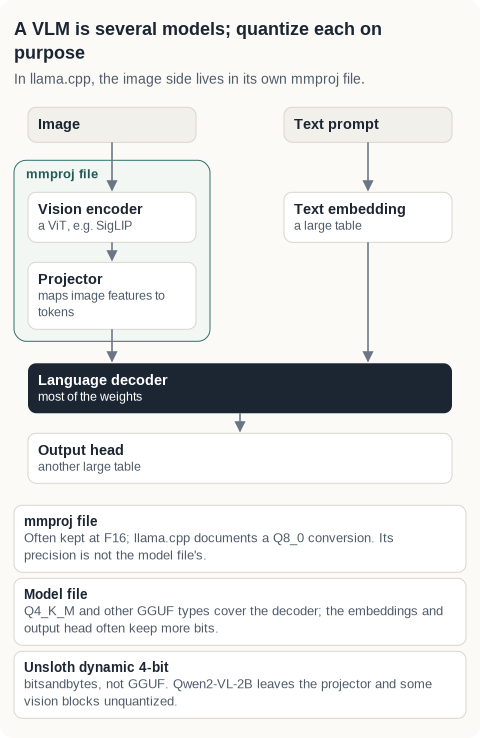
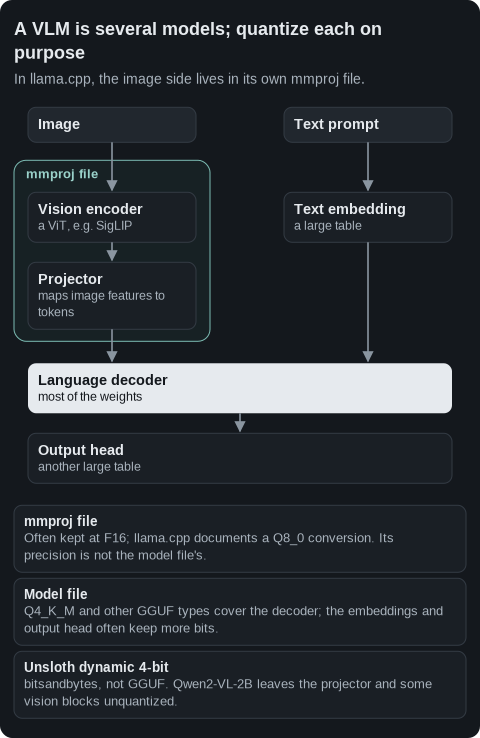
There is a measurable runtime cost too. In the 3090 report’s vision test, a Swift-1.5 Qwen3.8-27B IQ4_XS configuration at a 139,264-token allocation had a server footprint (dedicated + shared memory) of 21,776 MiB without vision and 23,246 MiB with it; decode was 47.42 versus 41.03 tok/s. The text and vision fills were 127,453 and 126,838 tokens respectively. This is a reported deployment comparison, not equal-context proof of the image encoder’s isolated cost.
The calibration workload should include the images and prompts the model will actually receive. OCR, charts, natural images and multiple images stress different components. Fix image resolution and preprocessing when comparing precision, because changing the visual token count changes memory and prompt cost too.
Recent methods make that allocation more fine-grained. QIG, CVPR 2026 estimates quantization sensitivity at token level instead of assigning equal importance to every visual or text token. It evaluates W4A8 and W3A16 recipes for large VLMs.
That is a different question from compressing a standalone CLIP encoder. For the VLM, evaluate the whole image-to-answer path: correct text extraction, chart reasoning, instruction following and latency. Language perplexity alone cannot check it.
What about CLIP or DINO on their own?
For an encoder used in search, the output is a representation rather than a sentence. Small changes in embedding direction can change the nearest neighbors, so the evaluation should follow the embedding into the task.
A ViT-B with about 86 million parameters takes roughly 172 MB for 16-bit weights or 43 MB for four-bit codes before scales. That is a smaller storage problem than an 8B language model. Whether quantization helps latency depends on the encoder kernels and batch size.
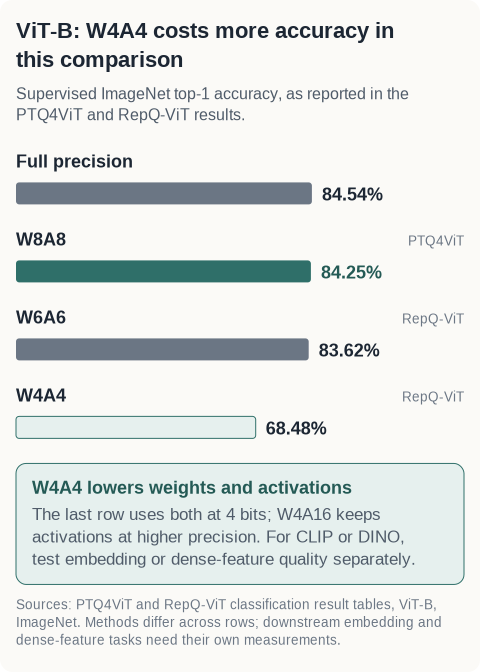
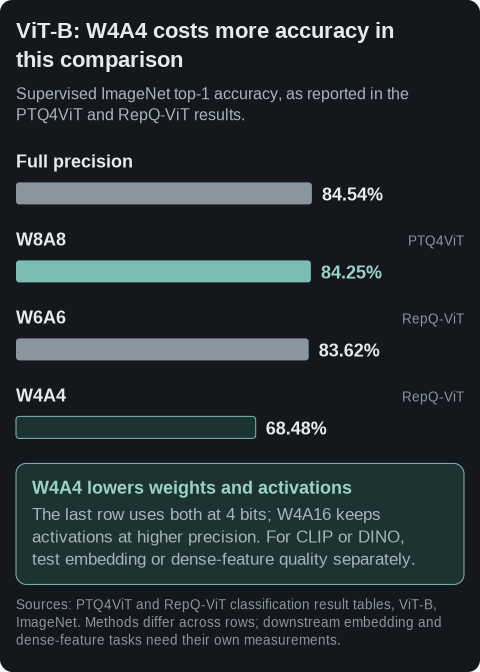
The figure compares supervised ViT-B ImageNet results: 84.54% top-1 in full precision, 84.25% at W8A8 with PTQ4ViT using 32 calibration images, 83.62% at W6A6 and 68.48% at W4A4 with RepQ-ViT. Four-bit weights and activations were difficult in those settings. That does not make a four-bit-weight CLIP checkpoint the same experiment.
W4A16 and W4A4 are different targets. A supervised classification model and a contrastive embedding model are different targets too. Keep those distinctions when borrowing a recipe.
ViT quantizers also have structure to exploit: activation ranges differ across channels, while attention probabilities have a very different distribution after softmax. PTQ4ViT and RepQ-ViT address those effects rather than applying one tensor-wide scale everywhere.
For CLIP retrieval, compare text-image similarity, nearest-neighbor overlap and Recall@K on the real collection. For DINO used in segmentation or depth, evaluate that downstream task. Cosine similarity to reference embeddings is a useful diagnostic, not a substitute for whether the retrieved items or dense predictions are correct.
What the download chart says about 2026
Model makers increasingly publish quantized checkpoints alongside the original weights. That changes the first step: check the official model card and supported runtime before looking for a third-party conversion.
Hugging Face counts downloads from file requests, not unique people. Repository downloads are neither market share nor a benchmark, and they do not tell you which precision inside a multi-file repository was used.
Three changes are worth watching: model-specific calibration, hardware-native low-precision arithmetic and architectures that store less sequence state. They affect different parts of the budget. A smaller weight file, a faster matrix multiply and a smaller cache can be combined; none replaces the other two.
Settings to copy
Start with one request so memory and latency are easy to interpret. Check your installed version’s help and startup log: supported flags and cache kernels change.
A local GGUF server with an 8K context and 16-bit cache:
llama-server -m model-Q4_K_M.gguf --ctx-size 8192 --parallel 1 \
  --n-gpu-layers all --flash-attn on \
  --cache-type-k f16 --cache-type-v f16
Then compare the same command with --cache-type-k q8_0 --cache-type-v q8_0. If you increase --parallel, check the effective per-request context in the startup log rather than assuming every slot receives the full --ctx-size value.
For a supported NVIDIA or ROCm checkpoint in vLLM:
vllm serve MODEL_OR_PATH --max-model-len 8192 --max-num-seqs 4 \
  --max-num-batched-tokens 4096 --enable-chunked-prefill \
  --enable-prefix-caching
vLLM normally reads the quantization configuration from the checkpoint. That does not make an unsupported model or kernel supported; select the compatible recipe first.
To create a GGUF with calibration statistics:
llama-imatrix -m model-f16.gguf -f calibration-train.txt \
  -o imatrix.gguf --no-ppl
llama-quantize --imatrix imatrix.gguf \
  model-f16.gguf model-Q4_K_M.gguf Q4_K_M
Use a separate file for the evaluation. Record the model revision, runtime version, calibration text, context length, device placement and cache types so the comparison can be repeated.
Common pitfalls
- Downloading the format before choosing the runtime. A GGUF, an MLX checkpoint and an AWQ checkpoint may contain the same model family but require different loaders.
- Budgeting only the weights. Cache, activations and workspaces occupy memory too.
- Reading storage precision as arithmetic precision. The kernel decides how packed values enter the dot product.
- Assuming a smaller file must be faster. Low-bit decoding cost and backend coverage can reverse that order.
- Using the same hardware rule for every vendor. Match the recipe to the GPU and software backend.
- Comparing warm prefix-cache throughput with cold traffic. They answer different workload questions.
- Using perplexity as the only quality check. Structured output, retrieval, OCR and reasoning need their own tests.
- Treating a VLM’s language precision as its vision precision. Check the separate components.
- Timing the first role-only response chunk as a first answer. Measure the first content or reasoning token and label it consistently.
FAQ
Should I start with Q4_K_M? For a supported local GGUF model, it is a useful candidate beside another four-bit allocation and a higher-precision recipe. For Qwen3.8-27B, check what your required context, cache, vision and drafter leave in memory; your own tasks decide which precision is useful.
Are GPTQ and AWQ obsolete? No. They remain relevant weight-quantization methods for supported GPU-serving paths. A new hardware format does not make every existing model, checkpoint or kernel disappear.
Is an IQ2 model always worse than a smaller model at four bits? No universal ordering follows from the filename. Compare the model family, recipe and task under the same memory and latency budget.
Should I quantize the KV cache? Compare 16-bit and eight-bit cache when context or concurrency makes the cache important. Check the attention backend and long-context behavior, then consider lower precision if it helps your workload.
Does quantization hurt MoE models more? There is no single ordering. Calibration must exercise relevant experts, while serving has to manage total weight residency as well as the active computation.
Can I quantize CLIP to four bits? Four-bit weights and W4A4 are different questions. Choose a supported encoder recipe and evaluate retrieval quality; the supervised ViT-B W4A4 result above does not settle every CLIP configuration.
Why use PTQ if QAT exists? PTQ adapts checkpoints that already exist. QAT changes training to account for a target representation. The useful choice depends on access to training, calibration data, compute and the format you will deploy.
What file should I use on a Mac? GGUF for a llama.cpp-based runtime, or an MLX-compatible checkpoint for an MLX runtime. Unified memory is shared with the rest of the system, so include context and application memory in the budget.
The short version
Start with a model that does the task, then choose a file your runtime supports. For local GGUF use, compare Q4_K_M with a higher-precision file before chasing the lowest bit count. Measure the weight-and-cache budget, the quality that matters to you and the speed at the context and concurrency you intend to use.
The next useful comparisons are still open: larger low-bit versus smaller high-bit models on your workload, four-bit cache at genuinely long context, and native low-precision kernels under realistic traffic. Those can change the download you would pick today.
Appendix: setup and sources
Qwen GPU cases. Chin Keong Ang’s RTX 3090 / Windows 11 report, llama.cpp build 10502 / 0adcc3bb5. The August 25 Q4/Q3 speed pair uses Q8 KV, MTP4/p-min 0.75 and roughly 90% of a 131,072-token allocation. The separate perplexity instrument uses frozen WikiText-2 raw test, 36 × 8,192 = 294,912 scored positions and FP16 KV. Aider uses 225 exercises, up to two attempts, a 32,768-token context, greedy non-thinking output and one full run per recipe. Its paired cost figures cover jointly solved tasks; matching totals do not establish equivalence. Vision is a separate October 4 Swift-1.5 comparison, one load per setting and two 400-token probes. Speed · quality · Aider · vision.
Qwen Mac case. Raw receipt dated August 27, 2026, repository revision 50adc2f: M5 Pro 48 GB, oMLX 0.6.3, mlx-community four-bit weights, DFlash2, KV8, temperature zero, one sample per target input length. Peak memory is not recorded per ladder row. The 130K envelope test is separately reported on 0.6.3rc3. The source Markdown mislabels early-response timing; the table above instead converts raw e2e_ttft.mean milliseconds to seconds using the pinned harness’s export units and first-content timestamp.
Qwen activation case. JGamboa’s custom NInfer RTX 4090 fork, Windows 11, September 26 paired comparison: identical weights, same binary, alternated artifacts. Selected projection inputs use the INT8 prefill path; decode keeps the original route. Its later September 27 headline benchmarks use another build/display condition and are not mixed into the pair.
KV calculations. Qwen3.8-27B config revision 1d4bf0f: 16 full-attention layers × four KV heads × 256 dimensions × keys and values. q8_0 stores 34 bytes per 32 values; q4_0 stores 18. These are logical attention-cache payloads. Add the 48 recurrent layers’ state, weights, draft/vision components, workspace and allocator effects. No DRAM-traffic counter is reported here.
Cache architecture comparison. DeepSeek-V4.1-Flash Figure 1(b) reports stored bytes including reduced precision. The architecture-gallery panel normalizes caches to BF16. Their different accounting is why the two panels are separate.
Research and documentation check. Original guide: October 15, 2026; Qwen case studies and cache calculations rechecked October 16. The official support tables describe the currently documented combinations; installed runtime versions can expose different kernels.
Implementation and runtime sources: GGUF specification · Hugging Face GGUF viewer · llama.cpp quantize · imatrix · perplexity scoreboard · server · multimodal support · vLLM quantization · vLLM Quark · vLLM GGUF · vLLM FP8 cache · LM Studio runtimes · Core ML precision performance.
Method and evaluation sources: Qwen3 precision and reasoning study · KIVI · SmoothQuant · QuaRot · SpinQuant · VPTQ · QIG · PTQ4ViT · RepQ-ViT · DeepSeek-V4.1-Flash.